


Shop Samsung
4.729.04K Reviews
App Specs
- Version
- 4.0.8
- Updated On
- License
- Free
- Downloads
- 10,000,000+
- Developer
- Samsung Electronics Co. Ltd
- Categories
- Shopping
- Platform
- Android, iOS
Screenshots
 Analysis by AppCompare
I think the best way to judge Shop Samsung is to treat it as a focused storefront rather than a general shopping app. It brings Samsung’s own product range into one place, which is useful when I already have a particular phone, television, appliance, or accessory in mind and want to compare options from the brand. The trade-off is clear: it is not where I would start if I wanted to browse products from many manufacturers or compare the whole market.
As a free shopping app from Samsung Electronics Co. Ltd, it makes most sense for people who are considering a Samsung purchase, already own Samsung devices, or want to keep an eye on the company’s current range. I would not install it expecting a broad marketplace. Its value depends on whether Samsung products are relevant to what I plan to buy.
A brand store, not a whole-market comparison tool
That distinction changes how I use the app. A general retailer can help me weigh competing brands side by side, while a manufacturer’s shop is better for exploring one product family in depth. If I am choosing between Samsung phones, for instance, a dedicated catalogue can make it easier to stay within that range as I compare designs and product details. If I have not decided which brand to buy, I still need other sources to understand the alternatives.
I would also separate browsing from deciding. A product page can help me narrow down what interests me, but I would check the details that matter to my household before ordering: dimensions for an appliance, compatibility for an accessory, or whether a particular device suits the way I use it. A polished shop experience does not replace that practical check, especially for a large purchase that is inconvenient to return.
Useful for planned purchases and casual browsing
The app is most helpful when I have a concrete reason to open it. I might be replacing a phone, looking for an accessory that fits a device I already own, or checking Samsung’s appliance range while planning a home purchase. It can also be handy for casual browsing when I am curious about what the brand currently sells, as long as I remember that browsing can make an upgrade feel more urgent than it really is.
For a realistic everyday example, imagine that my phone is still working but its case needs replacing. I could use the app to explore Samsung’s own accessories and keep the device model in mind while checking whether an item is suitable. Before paying, I would verify compatibility rather than relying on a product image or a recommendation alone. That small step can prevent a frustrating order, and it is a sensible habit whenever accessories are involved.
How I would decide whether it belongs on my phone
If I buy Samsung products regularly, keeping the shop installed can save me from having to find the official storefront again whenever I want to browse. If I shop with the brand only once in a while, using a browser may be enough; an app is not automatically better just because it is made by the manufacturer. I would choose the option that makes it easiest to compare the product and complete the purchase without adding another app I rarely open.
Worth Reading Before You Choose

Flipboard Shows What News Apps Must Do Beyond the Feed

Switching to Android Auto Means Rethinking Your Driving Routine

Google Calendar Makes a Crowded Week Easier to Manage

Ludo King Makes the Most of the Minutes Between Plans

Baby Panda World Brings Quick Play to Modern Phones, but Its Game Library Feels Busy

ESPN’s Live Game View Makes Following Close Games Easier
There is also a useful difference between a shopping app and a product-support app. I would open this one when I am looking at what Samsung sells or considering an order. For help using a device I already own, I would look for the relevant support resources instead of assuming a storefront is the best place to troubleshoot. Keeping those tasks separate makes the shopping experience more straightforward.
What to check before committing
Deals can make a purchase feel time-sensitive, but I would compare the final terms and the product itself before deciding. An advertised saving is only useful if the item is the right fit and the total cost works for me. For larger purchases, I would also review delivery and return information during checkout, rather than treating the presence of an in-app order process as a guarantee that every detail will suit my situation.
Notifications are another personal trade-off. They may be useful if I am actively waiting for an offer, but frequent shopping prompts can be distracting when I am not planning to buy anything. I would keep them only if they help with a current purchase decision. That gives the app a practical role instead of turning it into a steady stream of reasons to spend.
The app’s broad audience is reflected in its Everyone content rating, while its 4.6 average across around 94,000 ratings suggests that many shoppers have found it useful. It has passed 10 million installs, but popularity alone does not tell me whether it fits a particular buying style. For my purposes, the more important question is whether I want a direct route into Samsung’s catalogue or need a retailer that compares several brands.
For someone who already knows they want a Samsung product, that focused approach can be convenient. For someone still deciding between manufacturers, I would use broader retailers or independent comparisons as well, then return to the brand shop if Samsung remains in the running. That division of work is more reliable than expecting a single storefront to answer every buying question.
There are practical questions worth settling before making a purchase. Can I use it without being ready to buy? Yes: browsing a catalogue is a reasonable way to research, provided I treat suggestions and promotions as prompts rather than recommendations I must follow. Is it suitable if I want products from different brands? Not as my only shopping destination; a general retailer is better for that. Should I trust an accessory match without checking? I would not—confirming the exact device and compatibility is a safer final step.
I would also think about how often I want a dedicated shopping app on my device. Regular Samsung shoppers may appreciate having the storefront close at hand, while occasional buyers can get much of the same research done through a browser. Neither choice is wrong; it comes down to whether quick access is worth the space and notifications for me.
Browsing and Shopping Made Easy
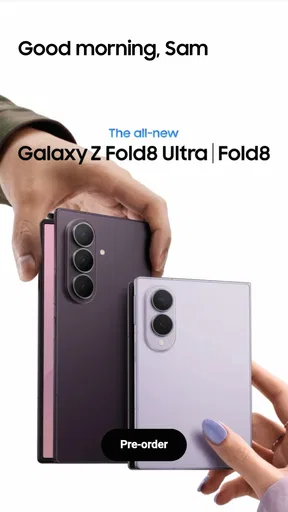
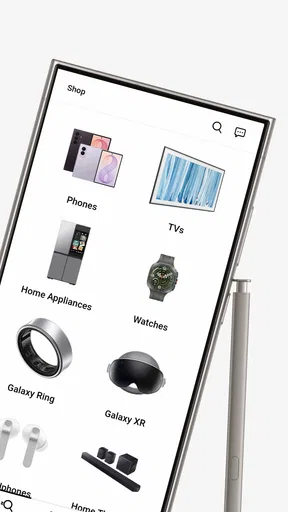
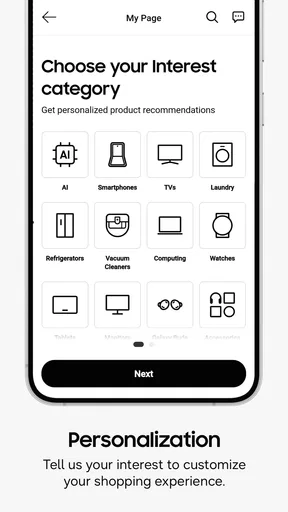
Right off the bat, the Shop Samsung app greets you with a sleek and user-friendly interface. It's so intuitive that even if you're not tech-savvy, you'll feel like a pro navigating through it. I was particularly impressed with how easy it is to browse through different categories. Whether you're eyeing a new smartphone, a smart TV, or just want to see the latest appliances, everything is just a tap away.
One of the features that really stood out to me was the personalized recommendations. Based on your previous searches and purchases, the app suggests products that might pique your interest. It's like having your own shopping assistant who knows exactly what you want. And let's be honest, who doesn’t love a little extra help when shopping?
Deals and Offers Galore
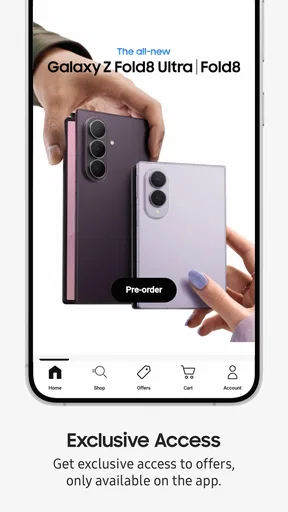
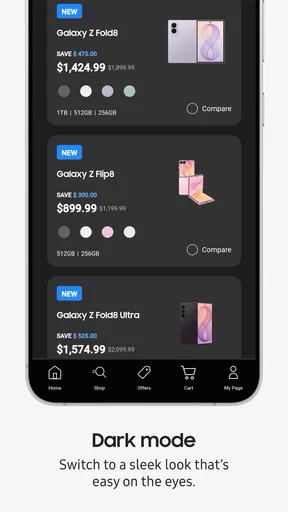
If you're always on the hunt for a good deal, you're going to love this app. The Shop Samsung app is loaded with exclusive offers and discounts that you might not find anywhere else. I stumbled upon some sweet deals on smartphones and accessories that were too good to pass up.
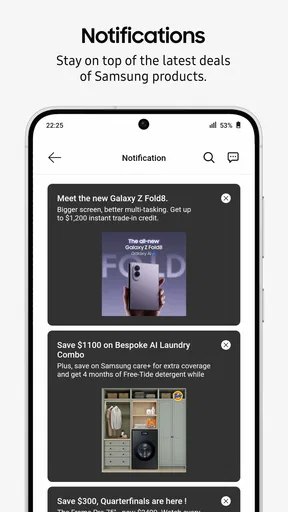
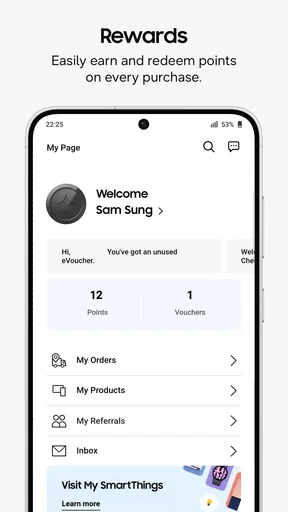
The app also keeps you updated with notifications about upcoming sales and promotions. You won't miss out on any limited-time offers, which is perfect for those of us who love a bargain. And let’s not forget the Samsung Rewards program – the more you shop, the more points you earn to redeem on future purchases. It's a win-win!
Easy Checkout and Payment Options
No one likes a complicated checkout process, and thankfully, Shop Samsung makes it seamless. You can save your payment details securely, so when you're ready to buy, it's just a few taps and you're done. Plus, the app supports various payment methods, including Samsung Pay, making it super convenient.
What I found particularly handy was the ability to track my orders right from the app. You can see exactly when your purchase is going to arrive, which is great for keeping those anticipation levels in check.
Customer Support and Assistance
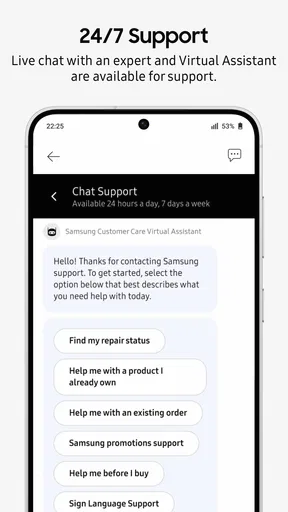
Another aspect where the app shines is customer support. If you ever run into issues or have questions, the app provides easy access to support. There's a live chat feature that connects you with a customer service representative. I tested this out, and I was pleasantly surprised by how quickly I got a response. It’s reassuring to know help is just a click away.
Additionally, there are helpful resources and FAQs within the app that can assist you with common queries. It's like having a knowledgeable friend who’s always there to help you out.
Final Thoughts
Overall, the Shop Samsung app is a fantastic tool for anyone looking to explore the world of Samsung products. It's easy to use, packed with features, and offers great deals that make shopping a breeze. Whether you're a loyal Samsung user or just exploring your options, this app is definitely worth checking out.
If you’re ready to dive into the world of Samsung, just download the app and start exploring. Who knows, you might just find your next favorite gadget!
What the version history means in practice
Samsung released the app on November 17, 2016, and its current version is 4.0.1. That long span gives the storefront a settled place in Samsung’s shopping experience, but I would not read a version number as proof that every screen or feature has recently changed. The useful point for an existing user is simpler: the app continues to have a defined current release, so it is worth checking that the installed version is current when a page, checkout step, or account function behaves unexpectedly.
For someone returning after a long break, I would approach it as a familiar shop that may have evolved rather than assume the layout is identical to the one remembered. Revisit the categories and account area before starting a purchase, then confirm the product and order details at checkout. That is a low-effort way to avoid relying on an old mental map, especially if the purchase matters or the item is intended for a specific device.
Small habits that make shopping more reliable
I find it helpful to decide on a short list of requirements before opening a product catalogue. For a phone, that might mean setting priorities such as size, camera use, or storage needs; for a home appliance, it might mean measuring the available space first. This keeps the app’s recommendations and promotions in their proper place: useful ways to discover options, not substitutes for deciding what will work in my home.
When I am comparing several Samsung products, I would keep a note of the exact model names rather than relying on a vague description such as “the larger one” or “the newest one.” That simple habit makes it easier to compare product pages later and reduces the chance of selecting a near-match. It is especially useful when browsing accessories, where a similar-looking item may not suit the device I own.
I would treat the shopping journey as several separate checks: discover a product, verify that it meets my needs, review the purchase terms, and then keep track of the order. The app’s appeal is having those shopping-related steps together, but I would still pause before the final tap. A quick review of the selected item, delivery details, and payment choice is more valuable than rushing through checkout because the interface feels convenient.
Who benefits most, and what may change over time
The strongest fit is a Samsung-minded shopper who wants one place to explore the company’s products and manage a purchase. It is less compelling for someone who buys across brands, prefers to compare sellers, or wants an app that serves mainly as a device manual. In those cases, a broad shopping service, a browser, or a dedicated support resource may be a better match for the task.
Samsung’s catalogue, offers, and app experience can change, so I would judge the current version by the specific product and checkout journey I need today rather than assume that an old promotion or past experience still applies. For existing users, the sensible thing to watch is whether the app remains convenient for the purchases they actually make; for new users, it is whether Samsung’s focused range is enough to justify keeping a dedicated storefront installed.
My overall view remains positive but selective. I would recommend it to a friend who is already considering Samsung hardware and wants a direct way to browse, buy, and follow an order. I would not present it as a replacement for broader comparison shopping or careful product research. Used for what it is—a brand-specific shopping app—it can be a handy companion, while the final decision still belongs to the shopper.
Pros
- User-friendly interface and navigation.
- Exclusive deals and offers available.
- Easy access to product information.
- Secure checkout with multiple payment options.
- Seamless integration with Samsung devices.
Cons
- Limited availability for non-Samsung users.
- App occasionally experiences slow loading times.
- Some features require Samsung account login.
- Push notifications can be overwhelming.
- In-app customer support could be improved.
FAQs for Shop Samsung
What features does the Shop Samsung app offer?
The Shop Samsung app provides a seamless shopping experience with features such as exclusive deals, early access to new products, and personalized recommendations. Users can also enjoy a virtual try-on feature for certain products, access Samsung Care for support, and easily track their orders in real-time.
Is the Shop Samsung app available for both Android and iOS?
Yes, the Shop Samsung app is available for download on both Android and iOS platforms. You can find it on the Google Play Store for Android devices and the Apple App Store for iOS devices, ensuring a consistent shopping experience across different operating systems.
How secure is my data when using the Shop Samsung app?
The Shop Samsung app utilizes advanced security protocols to protect user data. It employs encryption for transactions, secure login processes, and privacy settings to ensure that your personal and payment information remains safe and confidential throughout your shopping experience.
Can I use the Shop Samsung app to manage my Samsung account?
Yes, the app allows you to manage your Samsung account with ease. You can update your personal information, view your purchase history, and manage your subscriptions. Additionally, the app provides easy access to Samsung Care services, making it a comprehensive tool for all your Samsung needs.
What should I do if I encounter issues with the Shop Samsung app?
If you experience any issues, the app offers in-app support options, including FAQs, live chat, and customer service contact details. You can also check for app updates, which might resolve certain glitches. For persistent issues, contacting Samsung's customer support directly is recommended for personalized assistance.


